Introduction:
Automatescale is an impressive and powerful platform with outstanding service that offers smart automated evergreen funnels to help you boost your business. During the last years Automatescale has provided digital marketing services including CRM, page building, website making, appointment setting, LMS, member area, email automation, text & messaging. Nowadays Automatescale stands out with its brand new CRM features including AI conversation.
What is AI Conversation
AI conversation is a smart CRM tool that has just been released in the digital marketplace. Every serious business owner is now interested in this game changer tool because it comes with a number of useful features providing award-winning support to their businesses.
AI-powered CRM tools are meant to automate lead scoring, lead management, and campaign management. With the help of AI conversation you can focus on what matters most in your business management.
This tool allows you to book appointments on your calendar for your digital marketing agency. It requires just a couple of clicks to turn on and get started with it. It’s easy to use. Once it’s turned on, it’s ready to automate in the background.
How Can AI Conversation Help Boost My Business Management
The best thing about AI conversation is that it saves you time, efforts and gives precise answers to your customers keeping it all human-like and natural. Overall, your customers want to hear an answer from a human being and not a robot. So, AI conversation is quite smart to keep things going smoothly and naturally.
The faster and more relevant your response, the easier you’ll build mutual trust and better relationships with your customers. Thus, it's high time to get started with Automatescale’s AI Conversation feature to meet your customers' needs and demands in time. This feature can replace the traditional chatbot and provide faster and customized solutions.
Settings:
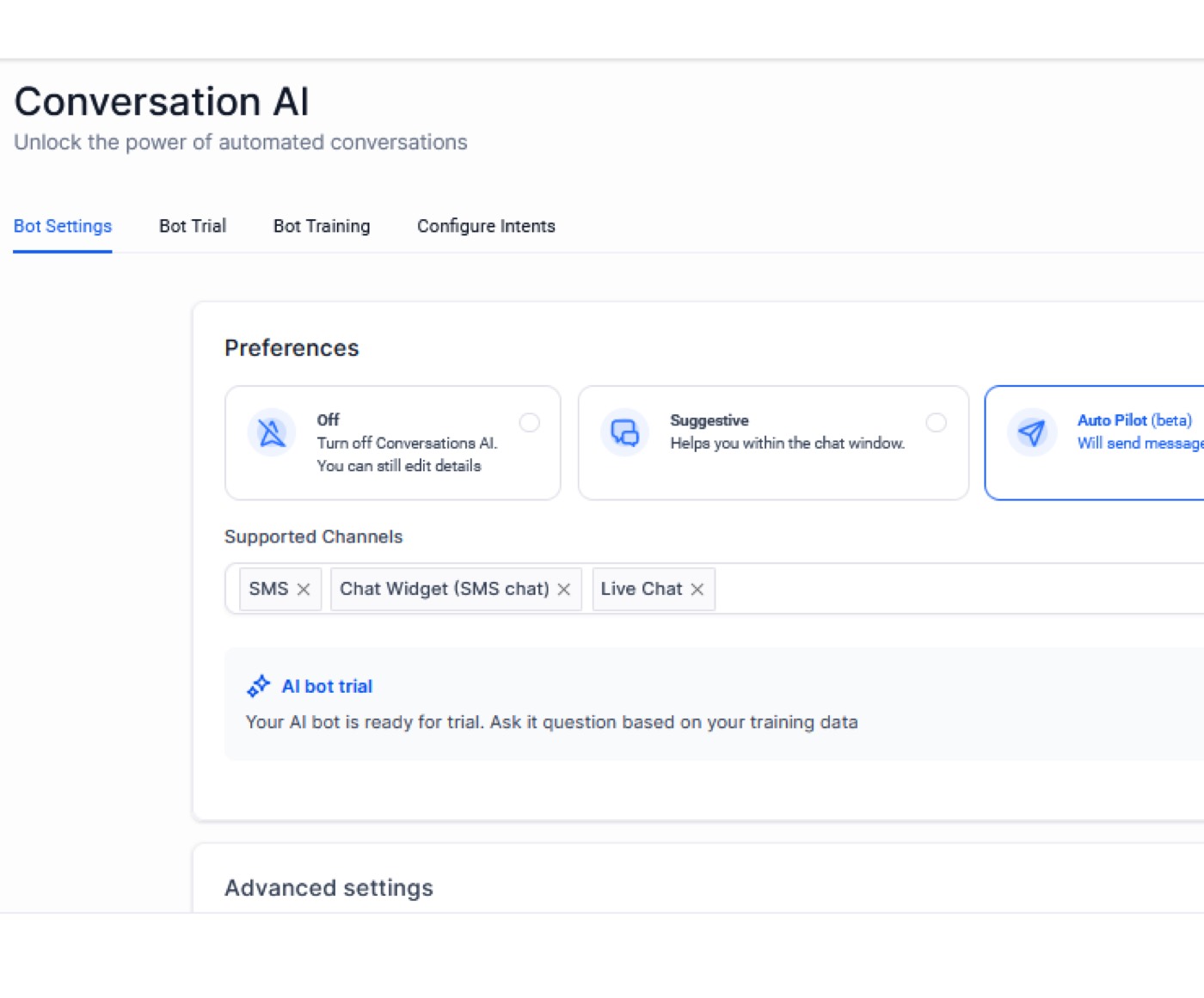
There are 3 main modes in AI Conversation:
Off: can be set on default and the bot is just turned off.
Suggestive: is used when a customer reaches out to your business offering a suggestive message whether it’s a support channel or sales channel.
Autopilot: And here comes the most powerful mode: “Autopilot”. This is the most impressive and useful mode in AI Conversation. It’s designed for efficient communication. Although this tool is still under improvements, it’s already an extremely helpful mode to use.
Features:
Inbound Message Handling: The bot takes some time to collect all the messages of a conversation and then provides a customized reply.
Channel Support: Auto-pilot supports channels like SMS, Facebook, Messenger, and Instagram. For instance, when a customer reaches out to your business by texting through one of those channels this AI bot can give an instant reply to the potential customer/client by sending a link to book an appointment on your calendar or on your client’s calendar.
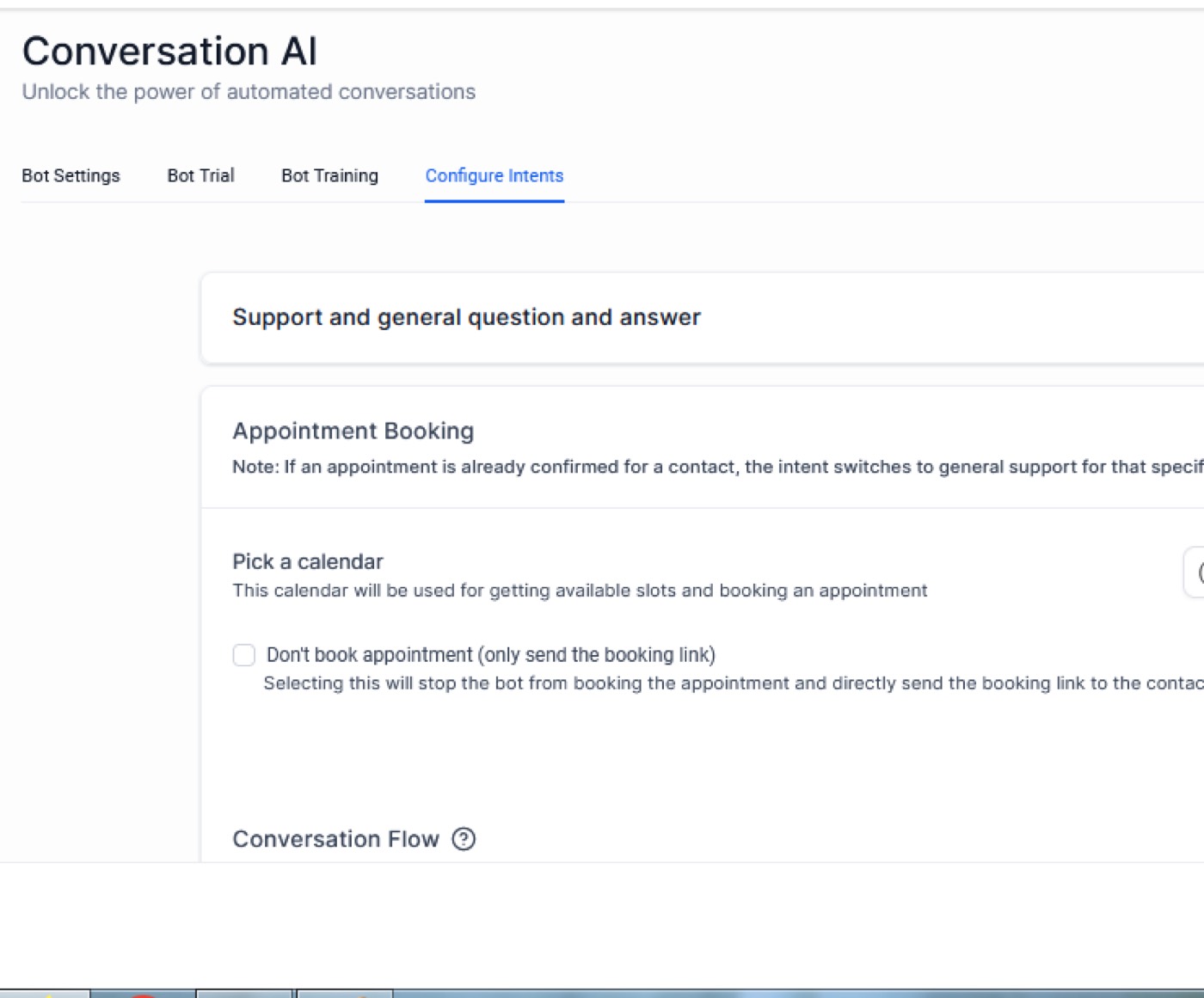
Sleep Mode: The Sleep Mode activates for 2 hours in case of a manual or a workflow-based message.
Feedback Mechanism: Every message from the Auto-pilot Bot comes with Thumbs up and Thumbs down features. They train the bot, give feedback, and can add FAQs.
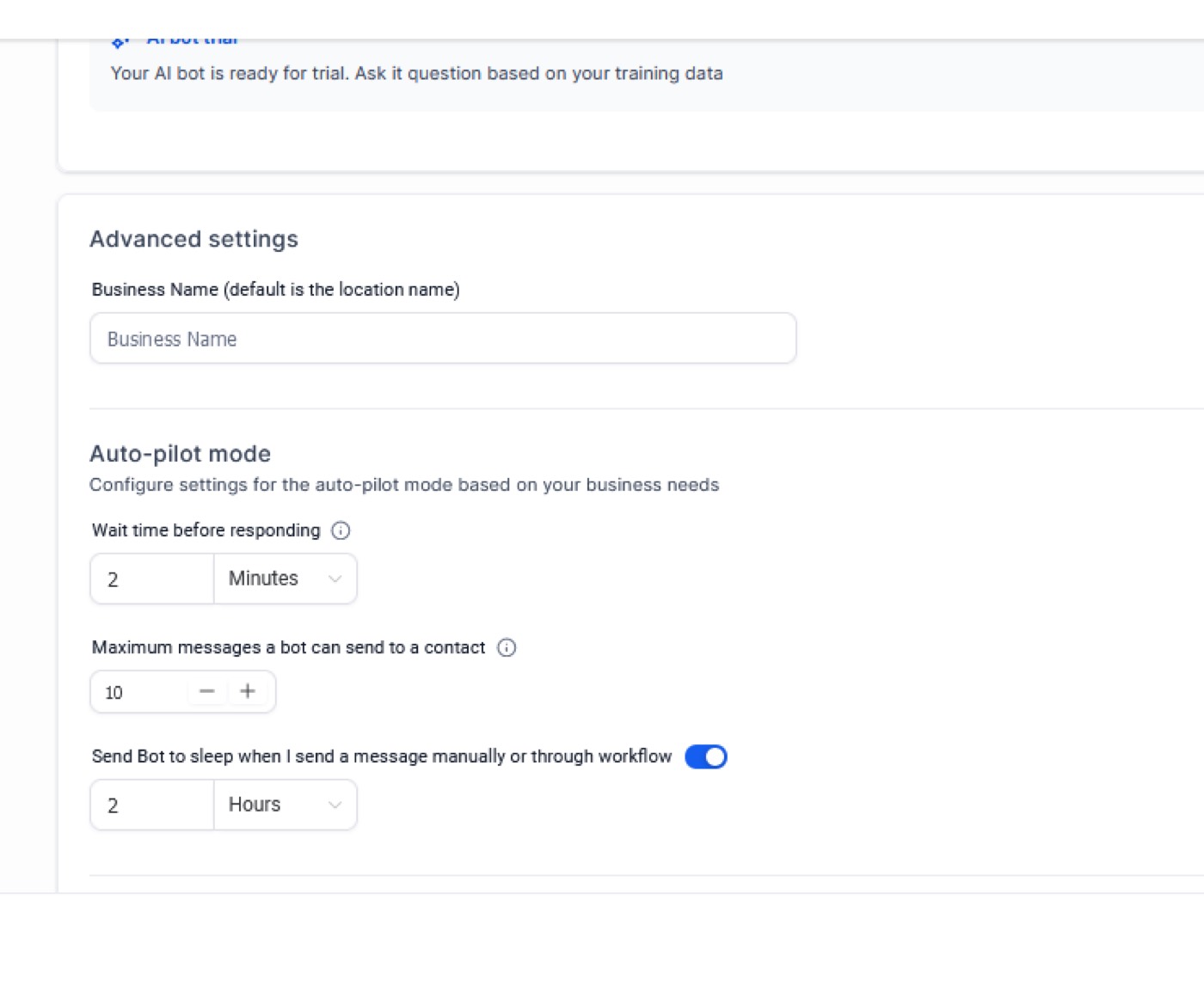
Appointment Booking: You should note that the main goal of the bot is to get appointment bookings for your business. So, the AI bot goes back and forth with the customer or potential client and after a few questions of making the person qualified, the bot sends them a link to booking appointments.
Advanced Auto-pilot Settings:
AI Bot Name Configuration: You can choose a business name for the conversation AI bot.
Wait Time before Responding: This includes a configurable time. The bot can collect all the messages between 1 second and 5 minutes before giving a reply. The default limit is 2 mins.
Message Limit: The default limit is 10 messages in a single conversation. The bot will go to sleep after the limit of messages is reached in a conversation. To activate the bot again, mark the conversation as "Read."
How to Use AI Conversation for Sub-Accounts
Go to your sub-account at Automatescale.
Click on Settings. Here you’ll see AI Conversation.
Click on AI Conversation and go to Bot Settings.
Turn off the AI conversation on the modes.
Pick the channels according to your preference (SMS, Facebook, Messenger, Instagram, etc).
Put a business name according to your preference and marketing needs.
Choose the maximum wait time for responding. It’s better to put it on for no longer than 10 seconds.
Now you can go to “bot training” and train the bot manually according to your preferred questions and corresponding answers. You can also use the new feature called Web Crawler.
Next, you can go to “Configure Intents” where you can pick a calendar to get available slots and book appointments. If you don’t see a calendar, you can create it yourself under the Calendar Settings.
Make the final changes on the “Automation tab” and test the final result on the “Conversation” tab.
Bot Training in AI Conversation
Bot training is important for several reasons. First, you teach it to understand client/customer queries. Second, it tries to find the most precise answer to the given question. Third, by training the bot you make sure you keep it up-to-date and in higher quality. Additionally, bot training doesn’t require fees.
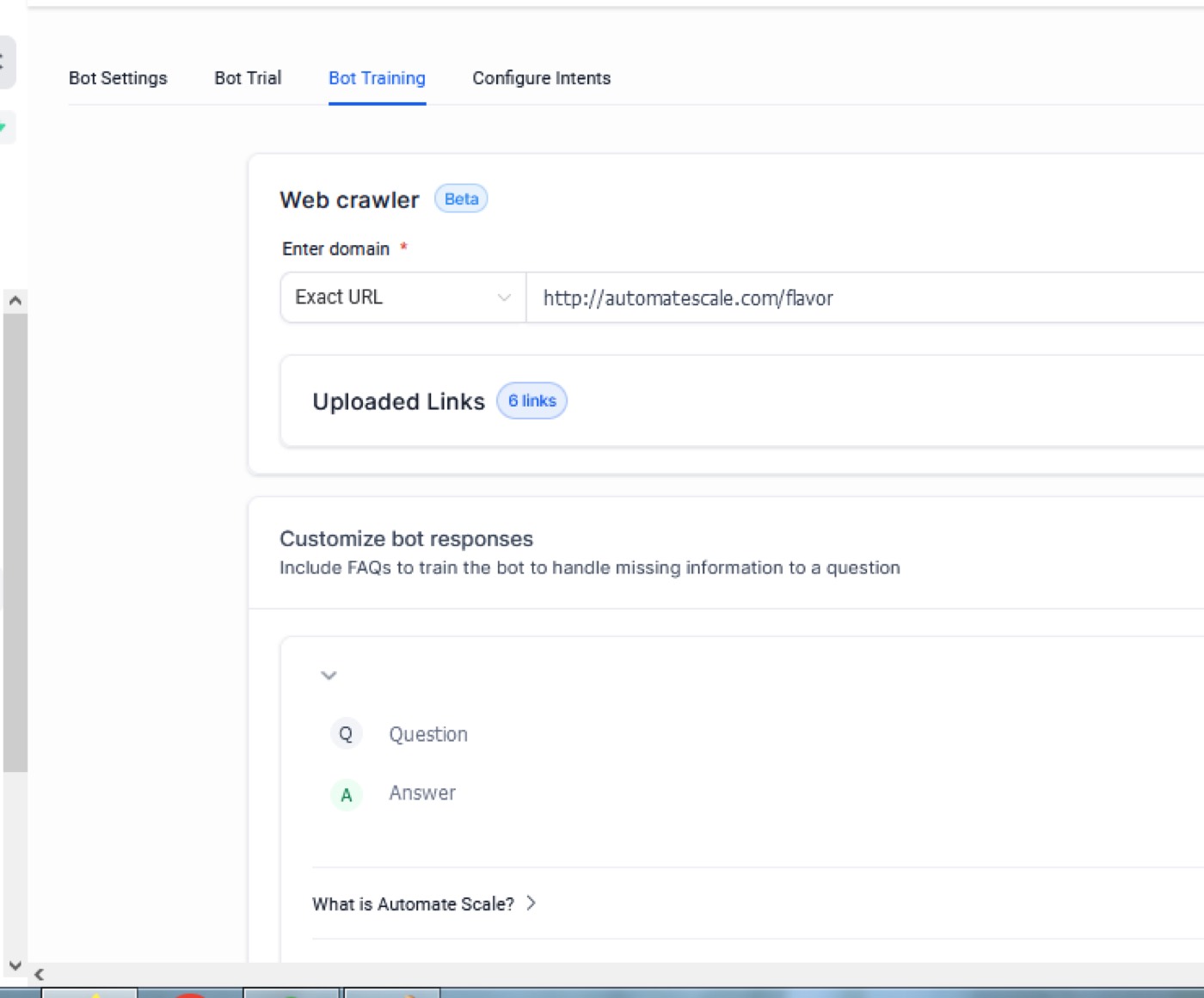
There is a special “Bot Training” section in AI Conversation that allows you to train the bot and make it ready to give accurate answers. You can find 2 ways to train the bot in your sub-account settings.
Adding questions and corresponding answer pairs: you can add questions and suitable answers manually according to your current marketing needs. The bot trains itself according to your question-answer pairs.
Providing Public links and Web URLs: instead of manual inputs, now you can provide web URLs. The bot has the ability to train itself through Web URLs. There are 3 ways to train the bot through Web URLs: exact URL, all URLs in the domain, and all URLs with this path. You can either provide the bot with an exact URL or all URLs in the domain or choose all the URLs with this path feature to crawl all the pages on the provided URL. The bot examines all the information and finds the necessary answers to queries.
FAQs:
What is Autopilot Mode in AI Conversation?
Autopilot mode is designed to provide facilitated and fast responses to leads and conversations.
How does AI affect your CRM?
By automating repetitive tasks, AI is able to enhance CRM systems. It comes with predictive solutions and analytics and allows CRM systems to better understand current and future customer needs, customer data and evaluate buying tactics.
★ Want this built for you? AutomateScale deploys the AI agent layer, funnels, and automations behind this — for agencies, SaaS founders, and coaches. Apply for a strategy call or subscribe to The Scale Brief.