Introduction:
Are you in search of the fastest and most effortless way to build your business website? Here we are with an amazing offer. You can build a website with Automatescale by using its innovative services including the latest AI marketing strategies.
This step-by-step guide will help you create your website at Automatescale and boost your business. Make sure you have an account at Automatescale and let’s get started with the instructions.
What can I do with the Automatescale Website Builder?
The Automatescale platform includes a website builder where you can create your own unlimited websites.The Automatescale website builder offers a number of useful tools to build a website using templates or starting with blank pages.
With the help of this website builder you can promote your goods/services. Automatescale website builder allows you to build separate websites for each promotion and any campaigns you want to run. You can also create websites for each of your clients according to their requirements.
You can add, edit, or delete website pages. You can adjust and edit your Automatescale website templates, build in columns, raws and sections including the header, footer and About Us. It also offers embed timers and progress bars as well as additional elements such as booking calendars, videos, and forms. Here you can create and customize a pop-up window. You may add custom elements using JavaScript or HTML.
How to Build a Website at Automatescale
Building a website with Automatescale is simple and quick. Anyone can do it even if they don’t have programming or coding knowledge. It takes less than an hour. Here is the guide to create a website at Automatescale.
Homepage: Templates and Forms
First, you need to enter your Automatescale account.
Then click on ‘Sites’ on the left side of the dashboard.
Here you’ll see several categories including Funnels, Websites, Blogs, WordPress, Memberships, Forms, Surveys, ChatWidget, Media, and URL Redirects.
Click on ‘Websites’ and click on ‘New Website’.
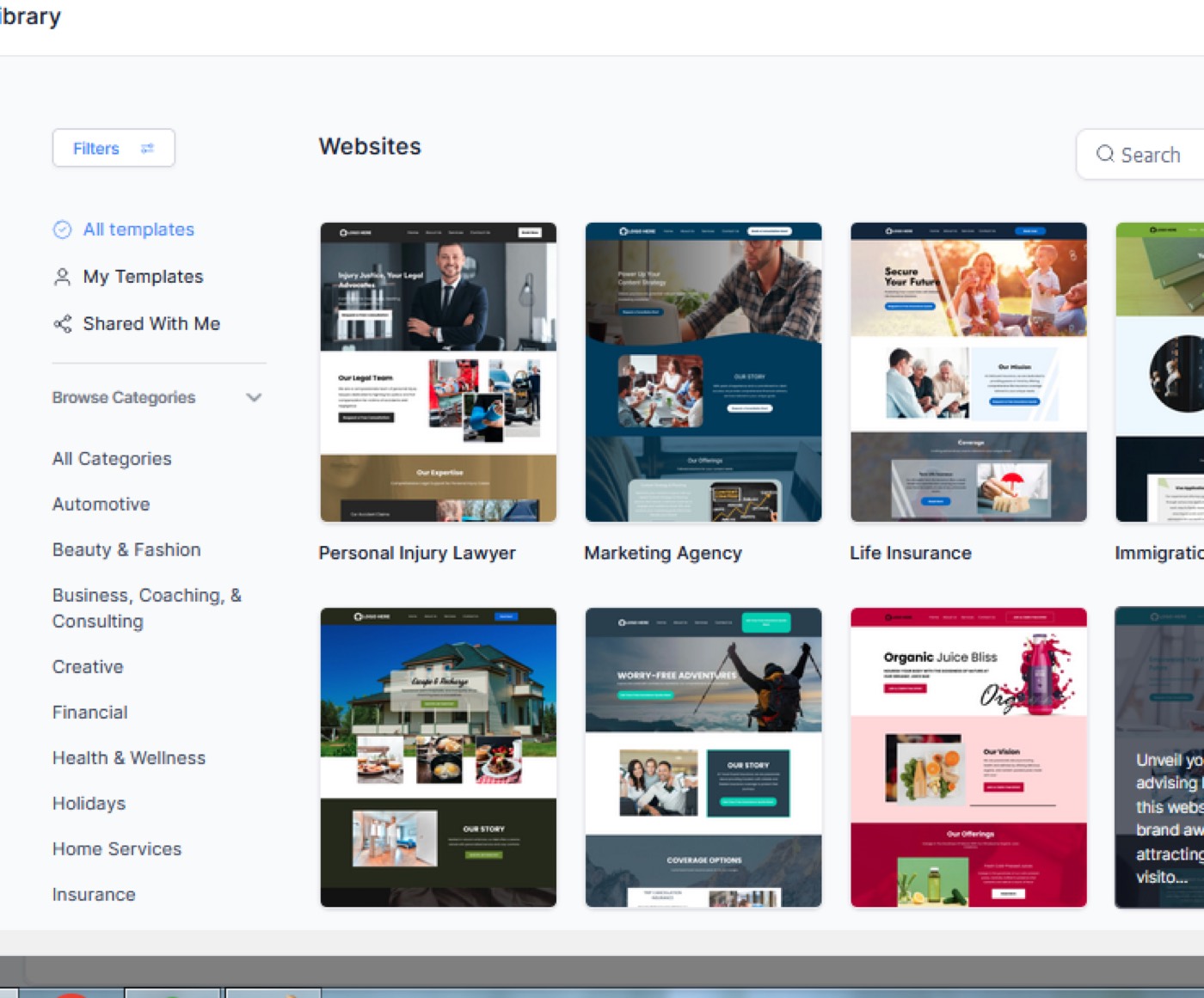
Go to the ‘Template Library’. Here you’ll see a template library that offers infinite options of templates to choose from. Choose one of the templates according to your business needs and preferences.
Click on ‘Get this template’.
There are 4 pages to choose from; Home, About Us, Services, Contact Us. Each of them comes with an ‘Edit’ option. Click on edit on the ‘Home’ page.
Now you see the entire template where you can make the desired changes. You can edit the background picture, the logo, the name of the product/industry/service/event/courses etc. You can resize the pictures you upload according to your preference. This way you create your sales funnels.
You can also add a calendar to your template which will then be used for appointment bookings.
Next, create a ‘Pop up’ form which will automatically pop up when someone ever loads up the website. You’ll find this feature on the top of the page next to ‘Settings’.
Once you click on ‘Pop up’, go ahead with ‘Add Raw’. Choose the column and click on ‘Add Element’.
Choose a form from ‘Form Picker’. Now you can preview/test the form and click on ‘Submit’.

About Us
You can easily edit each of the sections on the template. So, once you are done with the homepage, you can edit the ‘About Us’ section according to your service/services. Scroll down the screen and you’ll see the ‘About Us’ section at the bottom of the page.
Here you can represent your business and offers. You can also include short info about your team, your achievements and testimonials. There is a separate section on the template devoted to team members where you can add pictures and bios for each member.
Contact Us
Next comes the section ‘Get in Touch’ where you can add your contact information; phone number, address, email address, social media accounts, etc. Overall your website is a tool for the website viewer/customer to get in touch with you.
Calendars and Maps
There are some other useful features between settings such as calendars and maps. Calendars are helpful especially if you want your website users to book appointments. This gives an opportunity to put a date and time for appointments. As for maps, they help customers find your address(es) easily.
Pop-Up Window
The purpose of pop-up windows is to remind the website viewer/user to take action. You can add any element you want to your pop-up window. It’s customizable and can be edited anytime. This is another great feature of Automatescale’s website builder.
Two-Step Order Form
If you are selling or offering a product/service, there is a two-step order form to use when building your website. While a one-step order form allows the user to make a purchase without leaving the page, the two-step order form takes the user to a new page to make the purchase. This gives you the opportunity to add an up-sell item to the second page.
Our Services
It’s recommended to fill in the section ‘Our Services’ but it’s not mandatory. This section makes it clearer for the website-viewer what you offer. Try to keep it specific, concise and precise if you decide to add it to your website.
Note: When making changes on your website you’ll see differently colored boxes as you move your mouse around each box. They become highlighted and come in green, blue, purple and orange colors. This helps you orientate which aspect of the website you’ve selected:
Green box: Website section
Blue box: Row
Purple box: Column
Orange box: Elements
FAQs
Who is the Automatescale website builder for?
Automatescale website builder is for anyone who wants to create a website for business needs and not only. It’s an easy-to-use platform with accurate features that allow you to build the website you have always wanted.
What is the Automescale website builder used for?
The Automatescale website builder comes with many high-end features that allow you to build unique and eye-catching websites. You can build, edit and customize websites at Automatescale depending on your purposes and business needs. Then you can add elements such as booking calendars, forms, surveys, videos, and customize them according to your requirements.
Is it easy to use Automatescale website builder?
As mentioned above, Automatescale website builder is quite easy to use even if you have no coding or programming knowledge. Here you can create unlimited websites using the templates or starting with blank pages.
★ Want this built for you? AutomateScale deploys the AI agent layer, funnels, and automations behind this — for agencies, SaaS founders, and coaches. Apply for a strategy call or subscribe to The Scale Brief.